



5 Directions of UI/UX Modernization: With B2B Case Study and Tips
1. 5 Key Directions of UI/UX Modernization
4. UI Consistency and Component Systems
5. Optimizing UX for AI Integration
7. Case Study: UI/UX Modernization for Complex B2B Platform
8. Insights into Business Value of UI/UX Modernization
Outdated user experience is one of the key reasons for underperformance, even for strong, actively used digital products. So choosing a UI/UX modernization service provider is a strategic decision for companies that want their products to grow in line with user expectations, enhance user engagement, scale effectively, and remain competitively strong.
Over the years, as a digital product design agency, Artkai has helped dozens of businesses ranging in scale and industry modernize the user experience of their legacy products and complex enterprise solutions. Started as a design-first agency, we’ve grown into a strong full-scale team with a solid portfolio of cases and a deep understanding of the ins and outs of building up intuitive, user-centered experiences that are also development-friendly and business-efficient. That lets us unlock the full potential of existing digital solutions without the need to start from scratch.
In this article, we uncover our experience of providing UI/UX modernization services. Check the insights into 5 core areas of modernization that significantly impact business outcomes, illustrated with a practical case study of modernizing a complex, outdated legacy system for a European company specializing in utilities and maintenance services.
5 Key Directions of UI/UX Modernization
You perhaps remember the famous idea from one of Lewis Carroll's books, saying that “we must run as fast as we can, just to stay in place. And if you wish to go anywhere, you must run twice as fast as that.” Business people know this is not a metaphor but a real-life instruction for success, yet you’d also better be twice as efficient and user-friendly in addition to being faster. And that’s what modernization does. It gives legacy systems and digital solutions a new boost by updating their designs and reconsidering interfaces to deliver measurable, tangible business outcomes.
As one of the experienced top UI/UX design agencies, here at Artkai, we offer our clients 5 key directions of modernization depending on the current state of their digital product and specific business goals:
- Onboarding and activation
- Core workflow efficiency
- AI readiness of the user experience
- UI consistency and component systems
- Strategic modernization
As each direction addresses a specific user experience challenge, businesses can choose either one of them or a combination. Anyway, effective modernization doesn’t set off with the immediate massive UX redesign. Our practice shows that the solid foundation of effective UX modernization lies in clarity and deep understanding, where errors, inefficient interactions, or inconsistent system communication negatively affect business performance. So, UI/UX modernization services start with a thorough UX audit to identify areas that need to be fixed, tuned, or reconsidered. This allows the design team to make informed decisions aligned with clients' business objectives. We build design solutions that make subsequent modernization efforts more cost- and time-efficient, preventing costly remakes at the development stage or during product evolution.
Also, our experts employ the potential of modern AI tools for UX design workflow to amplify research and discovery, build complex vision, validate ideas and concepts, and maximize the efficiency of AI potential with the human-in-the-loop effect. It enables us to speed up delivery and deliver maximum impact to clients' businesses by combining deep human expertise with the latest technological advancements.
Let’s look more closely at the type of issue each modernization stage addresses, what the team does about it, and the values it brings out.
Onboarding and Activation
Onboarding and activation represent the type of UI/UX modernization that aims to make the early experience with the digital product smooth and straightforward for users. It reconsiders the flow of interactions to ensure a quick understanding of the digital product's value and keeps users engaged from the earliest steps.
One of the key problems legacy applications and platforms may have is that outdated or complex workflows deter users before they even reach the active stage or approach the conversion the business targets. Even if the interface is aesthetic, it doesn’t do its job if it’s not learnable and usable from the first step, or if new features, whatever their usefulness or problem-solving, aren’t made obvious and introduced through effective mental patterns. And even users who are highly motivated to solve their problem with your product may not become customers if they are not properly invited and supported by the system at every step of their journey. That’s critical for businesses struggling to maintain a competitive edge and engage new audiences, avoid drop-offs, and increase user adoption.
Deep research and a focused UX audit of the growth and conversion flow enable our design team to identify weak points and modernize the user experience, improving user engagement during onboarding, smoothing users’ decision-making, and thus increasing business efficiency.
When the client’s business needs this type of UI/UX modernization:
- If new users struggle to understand the entire process to achieve the value they seek from the application or software.
- Frequent drop-offs are observed during account setup, tutorials, initial feature exploration, or quick check-out.
- The product has high churn at early stages or poor user adoption: even with solid functionality and actively used by the existing audience for years, the product loses chances to constantly grow this audience or come into new markets
What products it is best for:
- Products with complex onboarding or setup processes
- SaaS platforms with trial or freemium models
- B2C or B2B platforms and applications with high user acquisition but low activation
- Digital products introducing new features, engaging a new audience, or entering new markets
What actions are done:
- UX audit of onboarding flows to identify friction points and confusing interactions
- Thorough research and analysis of user onboarding, signup, and primary conversion journeys
- Friction mapping of key decision points and moments leaking newcomers out
- Analyzing user behavior, user feedback, and drop-off metrics to identify points where users get stuck and ways to smoothly enhance usability and engage them to go further
- Redesigning outdated flows, ineffective microcopy, and guidance elements to streamline activation
- Testing improved solutions through prototypes, A/B tests, or usability sessions to reach the highest efficiency and ensure meeting the client’s specific business goals
What it fixes:
- Overly complex or confusing onboarding flows or pain points in introducing new functionality to existing users
- Lack of clear guidance or value messaging, which leads to poor communication of the digital product with new users, who could effectively use it for solving their problem
- High levels of user abandonment of the product before experiencing its benefits due to the complicated introduction, or users’ feeling unsure of its security and simplicity
What business value is delivered:
- Higher activation rates due to faster time-to-value
- Reduced early churn and improved user adoption
- Increased user engagement that contributes to long-term retention and growth
- Preventing “lost” revenue, which is caused by UX friction in the early steps of customer journeys
Core Workflow Efficiency
In complex enterprise systems or SaaS software, inefficiency may not be obvious as long-term users gradually adapt to broken or outdated workflows through workarounds, manual steps, or external tools. That may result in limited use and often doesn’t allow most users to uncover the full potential and competitive advantage of the product. Some functionality stays out of their view or appears too difficult or time-consuming. It may also be the reason for lower user satisfaction than the product aims to provide. Or conversion rates fall short of customer expectations, because users try paths they are already accustomed to but hesitate to try untried ones that may uncover new levels of the product’s competitive advantage. What’s more, this problem increases the number and frequency of support requests.
Our workflow efficiency audit, well-tested across various projects, helps uncover these hidden pain points before they turn into critical errors that put users off. Successful modernization of core workflows for legacy products ensures users can understand how the systems work. So, they communicate properly across all kinds of user interactions. Responsive design makes them clear and accessible on any device or environment.
Thus, this directly improves the digital solution's business efficiency. Users perform essential actions accurately and intuitively. That leads to improved user satisfaction and reduces operational overhead.
When the client’s business needs this type of UI/UX modernization:
- Users struggle to complete essential tasks or use the full range of functionality
- Critical workflows are error-prone, inconsistent, or slowed down
- Users depend on workarounds (e.g., manual adjustments, document exports, shadow processes), which signal broken core workflows
- Manual data entry error rates reach 15-20%, indicating the interface is failing to provide a necessary level of clarity and simplicity, thus breaking the efficiency of the product
- The growing systems show increased task completion time, as routine tasks require excessive clicks or complex navigation, resulting in a negative impact on overall performance
- The current frameworks hamper adding new features, making it costly or technically risky
- Usability issues in core functionality lead to the high frequency of support requests.
What products it is best for:
- Enterprise platforms and complex internal digital tools
- Workflow-heavy SaaS products (CRM, ERP, analytics systems)
- Products with multistep processes and complex, multilayered role-based access
- Systems where efficiency and speed of interaction directly impact business operations
What actions are done:
- Thorough workflow audit to map and analyze key user tasks
- End-to-end mapping of critical workflows
- Observing real users, analyzing user expectations, and studying user feedback to identify pain points, bottlenecks, and errors
- Review and analysis of context switching, handoffs, and role-based complexity of the digital product
- User interactions are redesigned to improve navigation and reduce mental effort.
- Integrating in-context tooltips, shortcuts, or automation where it’s needed to meet user needs and speed up reaching the goal of making a decision
What it fixes:
- Long or confusing task flows
- Frequent errors or repeated steps that users tend to make when interacting with the product
- Low efficiency of the legacy system and high dependency on support teams
What business value is delivered:
- Users complete tasks faster and make fewer mistakes, demonstrating higher engagement and a lower fear of making mistakes.
- Operational efficiency and user independence increase, which reduces support load
- Enhanced user satisfaction leads to higher retention, faster decision-making, and increased productivity.
- Multi-level enterprise systems show stronger team efficiency across roles and reduce operational waste, which turns into bigger sales and an enlarged audience of product users
- A flexible modernization approach focused on efficient scalability and consistency adapts to the product’s unique needs and aligns with current business objectives
UI Consistency and Component Systems
This UI modernization direction addresses inconsistencies in design patterns, components, and interactions that can arise as a product grows and evolves. They slow down development, decrease user engagement, and create fragmented user experiences, which may confuse or annoy users systematically and lead to drop-offs and low conversion rates.
Unfortunately, over time, for many growing products, inconsistency stemming from a minor design issue can grow into a crucial delivery bottleneck, as product teams invest unreasonable time and effort in rebuilding the UI instead of focusing on shipping value.
Artkai's design team provides clients whose legacy systems face this problem with a design system and UI consistency audit, turning the identified issues into a clear modernization plan. Deep expertise and diverse experience enable us to reconsider the internal and external consistency of all the interactions and responsive design, ensuring that design and code are unified. It contributes not only to improving current user satisfaction and usability but also to the future scalability and maintainability of the digital product.
When the client’s business needs this type of UI/UX modernization:
- The complex legacy application or software fails to achieve business goals and deliver a positive user experience due to inconsistent design patterns across modules or platforms
- Development cycles are slowed by the need to rebuild design and code
- The legacy product user experience design is mostly based on some fragmented UI kits or libraries, as it doesn’t have a united design system at all
- The product is scaling rapidly, so standardized components are critical to accelerating growth and improving maintainability.
What products it is best for:
- Mature products with multiple modules, user roles, or teams
- SaaS platforms that are scaling rapidly with frequent releases
- Digital solutions with inconsistent UI across web/mobile platforms
- Systems showing a lack of alignment between design and development teams
What actions are done:
- UI audit identifying inconsistencies in styles, components, and interactions
- Thorough analysis of the component inventory and reuse
- Standardizing colors, typography, buttons, forms, and other UI elements
- Building up the design system and a component library that addresses design and front-end implementation
- Review of design-development workflows and handoff processes to find and remove the pain points and issues preventing efficiency
What it fixes:
- Fragmented user interfaces and visual inconsistencies negatively impacting user experience
- A lack of reusable components results in time-consuming updates of the product, which may be crucial in keeping a competitive edge and meeting user needs
- Difficult scaling or extending the product
What business value is delivered:
- A consistent user experience increases trust and enhances user satisfaction
- Faster product delivery with reusable design and code components
- Effective maintenance and cost-efficient scalability for future features or platforms
- Improved collaboration between design and engineering teams
- Building a solid foundation for future product growth and keeping aligned with user expectations and industry trends
Optimizing UX for AI Integration
To stay competitive and adopt the latest technologies, many businesses aim to integrate AI into their applications, enterprise platforms, and software solutions. Yet, AI integration into any user interface and customer journey is primarily a UX challenge rather than just a technical operation. Adding artificial intelligence features without a proper UX foundation increases the risk of missing the full potential of new technologies, as the added features may feel inconsistent within the existing workflow or remain underused.
Before introducing AI, it is important to involve the UX design team to fit it into context and reconsider the user experience design to make the digital product ready both structurally and experientially. We offer our clients an AI-readiness UX audit to help identify whether the current product experience supports AI and what needs improvement before integration. This leads to simplified workflows, clarified user intent, and interactions that naturally support automation, recommendations, and intelligent assistance. Also, a wise approach to UI modernization, based on the product's AI readiness analysis and potential, will make the integration process more effective and quicker for the development team implementing the project.
When the client’s business needs this type of UI/UX modernization:
- The company aims to support specific business goals and enhance the customer experience by introducing AI features such as copilots, automation, and recommendations
- Current workflows are too complicated, outdated, or inconsistent to support AI-driven interactions at the existing stage
- User journeys lack clear intent, hindering meaningful AI integration.
- The product's accumulated UX debt significantly limits AI adoption.
What actions are done:
- An AI readiness UX audit is conducted to assess current interaction patterns and user flows
- Workflows are simplified and restructured to become compatible with AI-driven logic
- Key user actions, decision points, and expected outcomes are clarified to be met through effective integration
- User experience experts identify where AI naturally enhances the experience and prevent cases where it may disrupt UX.
- Correspondent interaction patterns are designed for future AI features, such as suggestions, automation, and feedback loops.
- UI and UX solutions are designed to support explainability and control, as well as increase user trust.
Business value delivered:
- Fast and smooth integration of AI-powered features
- Higher adoption and intuitive UX of AI functionality
- Preventing failed AI investments due to poor usability
- Stronger positioning as an AI-ready, future-proof digital solution effectively responding to market trends
- Thought-over scalability of AI features without redesigning the product later
Strategic UX Modernization
While some digital solutions struggle with a specific issue requiring modernization, others may face a combination of specific niche pain points, UX debt, or uncommon workflow weaknesses that don’t fit standard modernization categories or require unique solutions.
Recognizing the need for UI/UX modernization, companies aim to build a custom strategy to meet the product's industry- and audience-specific requirements and objectives for product growth.
At Artkai, we usually approach this request with a quick audit to identify the product’s issues that prevent it from achieving business goals. This initial assessment enables our design experts to offer various strategies, such as:
- a full, detailed audit and strategic redesign, with the creation of a phased, step-by-step roadmap addressing all critical UX and product issues.
- a focused approach targeting specific, high-impact flows that directly affect revenue or the achievement of core business goals, so that teams could redesign them quickly.
When this type of modernization is needed:
- The legacy system has accumulated considerable UX issues without a clear starting point or a relatively standard UI modernization framework
- Stakeholders have no clear vision on whether to invest in a full redesign or incremental improvements
- Business goals evolve and aim at scaling the existing system, adding new features, or entering new markets, and require an expert approach to building a tailored modernization strategy
- The product has non-standard, unique workflows that need flexible modernization approaches
What actions are done:
- Fast audit to assess the product state and identify key pain points and critical frictions
- Review of the interactions, user flows, and consistency of the user interface
- Aligning with stakeholders to deeply understand business priorities and constraints
- Defining the more effective modernization strategy for the particular case: full redesign roadmap addressing all issues over multiple phases or highly-focused, targeted redesign of critical flows for quick, high-value wins
- Setting clear recommendations and implementation paths based on the defined strategy
What business value is delivered:
- Clear prioritization before the modernization process starts
- Faster ROI reached through quick wins on modernized high-impact flows
- Reduced risk of misaligning UX redesign efforts with real business objectives
- Increased efficiency of the teamwork and focus on business outcomes that are set as priorities at the current state, with scalability in mind
Case Study: UI/UX Modernization for Complex B2B Platform
One of our recent projects is a good example of strategic modernization tailored to industry-specific business objectives. The Artkai team was approached by a growing European power industry company specializing in utilities and maintenance services.
Over the years of operation, they have evolved into a data-intensive ecosystem with cross-role dependencies with multiple digital solutions, a complex architecture, and interconnections within the product family. As the ecosystem grew more complex, it suffered from inconsistency and a weak information hierarchy, making core tasks hard to understand at a glance. That resulted in high drop-off rates, complex interactions, and slowed decision-making. We also discovered that users relied on external tools to compensate for missing system clarity, and that users in different roles interpreted the same data differently.
The Artkai team needed to approach it not as a single legacy product but as a set of products that work together. So, it was a multi-layered effort with different roles, workflows, and platforms and websites.
We conducted product discovery, behavioral analysis, heuristic evaluation, and a usability audit across key journeys. The findings were aligned with the stakeholders’ vision and goals for the product system. This case was not a matter of visual and interaction redesign but demanded a complex approach and overall UX revamp.
So, based on deep product discovery and market research, the team:
- Identified the pain points that provoked drop-offs and abandonments at all stages and for different user personas.
- Defined and removed inconsistencies that created bottlenecks in user interactions and blocked or slowed down the understanding of how the system works and communicates with the users.
- Analyzed user expectations and various feedback, and collected practical insights by conducting usability testing. That resulted in building efficient ways of interaction for each user role.
- Employed the potential of new technologies and AI tools such as Figma Make, LLM, ML, and research tools for exploration, documentation, idea search, and validation in a solid human-in-the-loop scheme. That enabled designers to shift from repetitive routine tasks and focus on complex ideas and solutions, speeding up delivery.
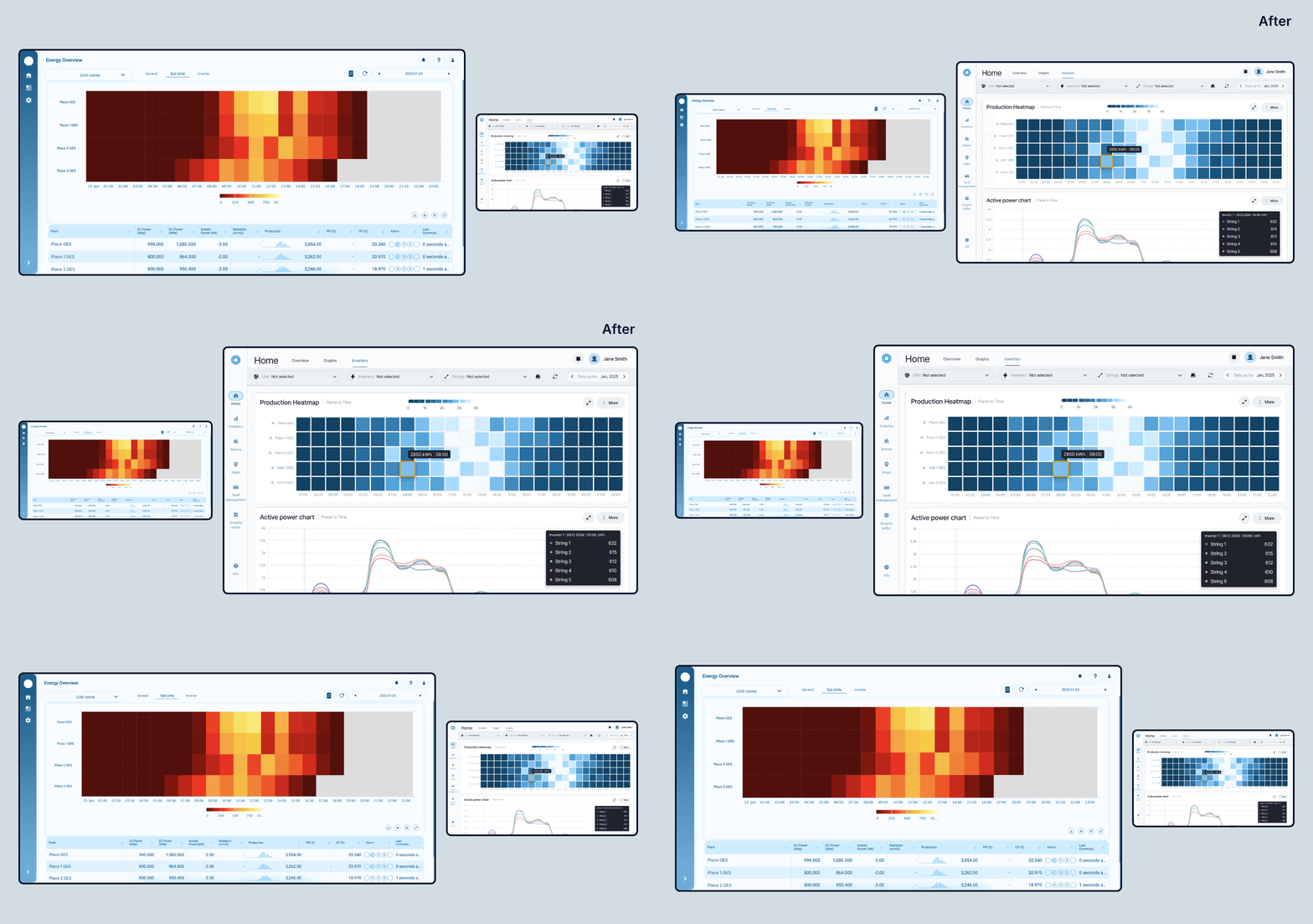
The modernization approach provided the product system with a range of strategic improvements that influence performance and business outcomes, for example:
- The onboarding and registration process was reconsidered to become simple and clear, and enhance user engagement
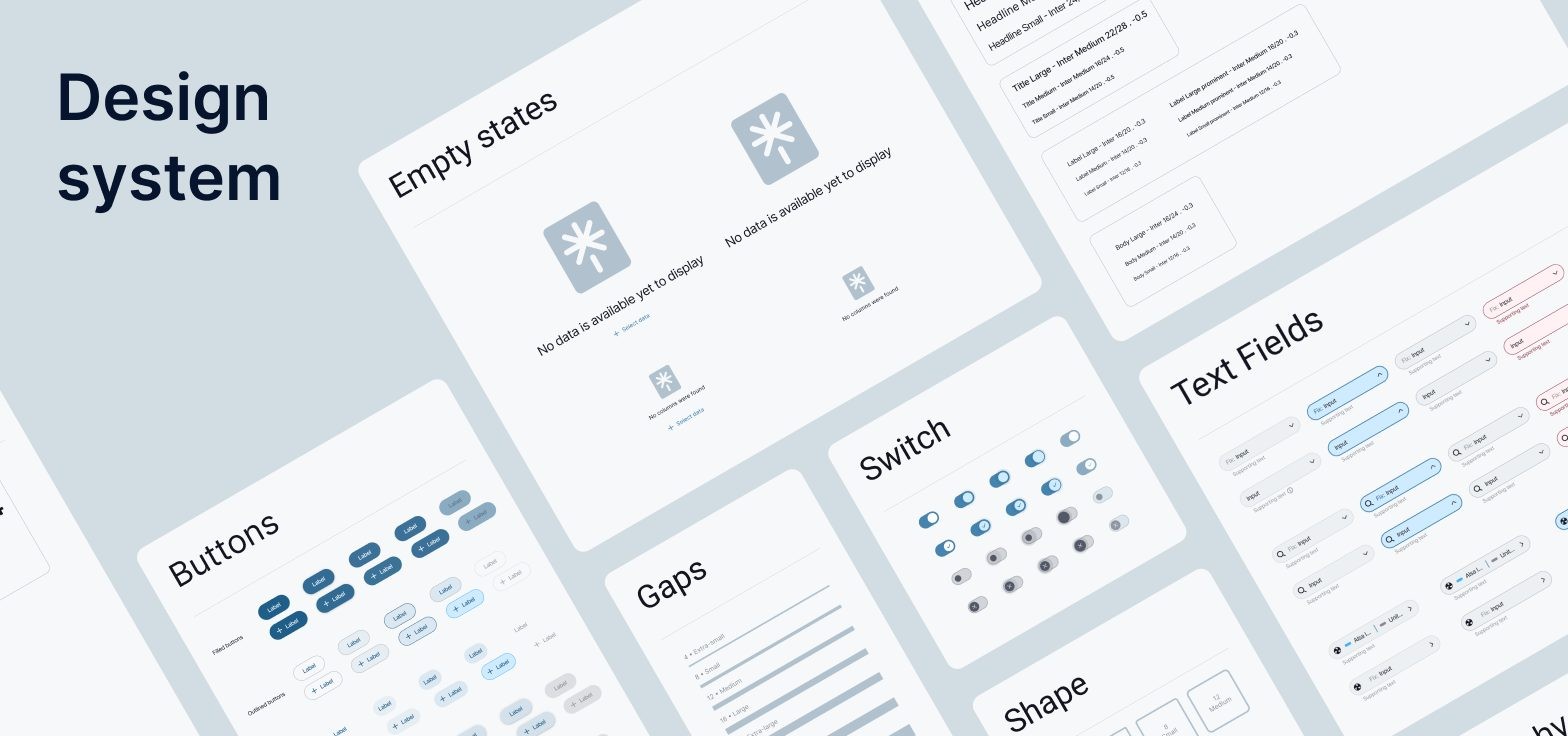
- The provided modern design system and library UI components, tokens, and structured solutions enabled speeding up the development process and effective UX design implementation on web and mobile devices
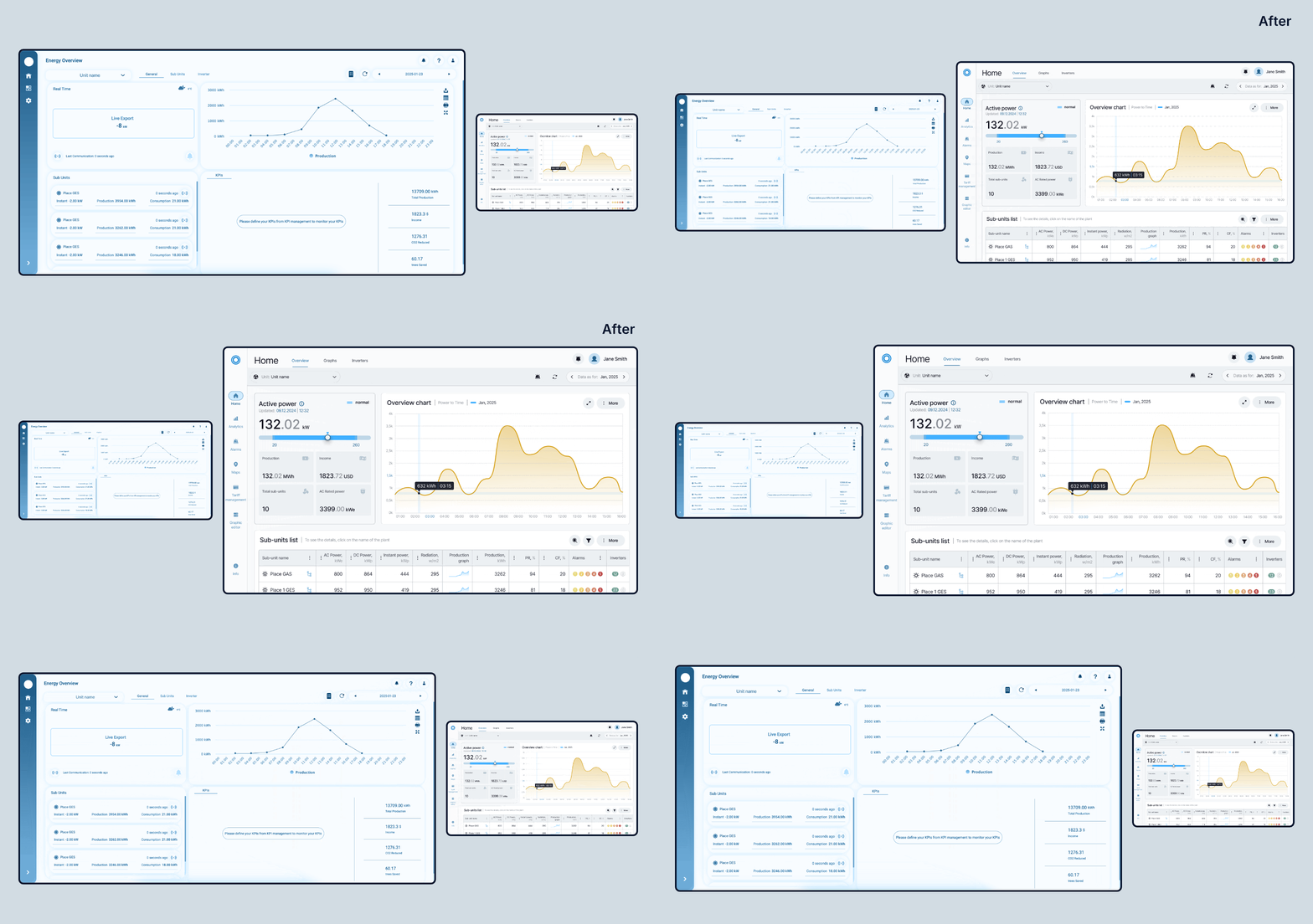
- Mental efforts and load got reduced significantly due to enhanced interactions, well-designed user interfaces, and balanced information density
- Higher user independence and lower support load led the company to higher sales and customer satisfaction
When the first stages of modernization were implemented, the client could see measurable business outcomes aligned with the expected business goals. For example, the reconsidered and updated products in the ecosystem showed reduced time required to complete key tasks and fewer errors in critical workflows. The overall improvement in user experience across different interaction flows and user roles led to higher conversion rates, as well as boosted user engagement and trust in the company's products.
Our collaboration turned into a long-term strategic partnership, enabling Artkai designers and engineers to boost the business with a systemic, consistent approach to user-centric, development-friendly user experience design.
Insights into Business Value of UI/UX Modernization
Having modernized 50+ digital products and legacy enterprise applications and analyzing this experience, here at Artkai, we have seen how far it extends beyond just a design upgrade, as some businesses may initially see it. This is one of the most effective ways to improve product performance, meet evolving user needs, and reduce users' mental effort as the product becomes more complex. Taken expertly in line with the client’s company goals, it’s the direct method of unlocking the next stage of business growth and measurable outcomes, from acquisition to retention and operational efficiency.
Let’s look more closely at key aspects of business value and the benefits of UI/UX modernization.
Faster Activation and Higher Conversion
When users get a usable, learnable experience from the very start of interaction with a product, and it’s easy to use, they activate and convert faster and tend to come back due to the initial positive user experience. So, improved onboarding performance is one of the most obvious and quick effects of UI/UX modernization.
Companies that keep an eye on introducing their product effectively through timely optimization of onboarding and early interactions typically see:
- 20–40% increase in activation rates
- 15–30% reduction in early-stage churn
- 10–25% improvement in trial-to-paid conversion
UX improvements that may seem minor, such as simplifying forms, clarifying messaging, tuning visual design, or restructuring flows, can unlock revenue that previously tended to be lost due to friction and uncertainty.
Increased Efficiency and Lower Operational Costs
If the product relies on heavy workflows, the impact of inefficient UX is massive. It directly translates into user errors, wasted time, user annoyance, and increased support costs due to frequent requests.
Core workflows improvement, based on deep analysis of pain points and outdated workflows, allows businesses to achieve:
- 30–60% reduction in user errors
- 20–50% faster task completion times
- 15–35% decrease in support tickets related to usability issues
For enterprise-scale products with different user categories, this has a significant financial impact. With hundreds or thousands of users interacting with the system daily, modernizing user interfaces to remove inefficiencies and bottlenecks, and increase intuitiveness and usability, results in productivity improvements and substantial cost savings.
Faster Delivery and Reduced Development Costs
Inconsistency in user interfaces, the absence of up-to-date, well-thought-out responsive design, and the lack of systematic, reusable components slow down product teams. The modernization process that establishes a structured design system eliminates the need to rebuild UI elements from scratch for every new feature, integration, or scalability case.
Implementing UI consistency and component systems, companies may expect to reach:
- 30–50% faster design-to-development cycles
- 20–40% reduction in front-end development effort
- higher predictability of release timelines and fewer rework cycles
This way, teams shift focus from repetitive tasks to delivering new value and boosting general product evolution.
Stronger Retention and Customer Lifetime Value
Successful modernization considerably influences long-term engagement and customer retention. Updating digital interfaces and improving user engagement as products get easier to use and more intuitive, companies increase the business efficiency of their digital products and enterprise systems. Users return more frequently, interact with the product faster, and complete more actions. The drop-off rate is reduced across the lifecycle, and customer satisfaction and trust increase.
As a result, companies may expect:
- 10–25% increase in customer retention rates
- Stronger product position in competitive markets
- Higher customer lifetime value (LTV)
Competitive Advantage
UI/UX modernization is much more than refreshing the product's look or improving some aspects of the product's functionality. It’s a matter of strategic influence on how your product is perceived, chosen by users, and valued in the market. In the tight competition among existing and new digital products, UX works among the key differentiators. It not only affects product convenience but also directly drives business outcomes, such as deal success and pricing power.
Our practical experience shows that some key ways in which UI/UX modernization strengthens competitive positioning are the following:
- Higher win rates in product comparisons. When evaluating multiple solutions, products with simpler UX designs are more frequently selected, potentially increasing win rates by up to 20% in competitive evaluations.
- Shorter sales cycles. A well-structured, usable, and learnable product reduces the need for massive explanations and intensive support, thereby shortening sales cycles by 15–25%, especially in large SaaS software and enterprise-scale products.
- Stronger perceived product value. UI/UX design directly influences how advanced, secure, and reliable the product feels and how it builds trust, which in turn affects a company's ability to justify higher pricing, even when competitors offer similar functionality.
- Reduced risk of losing deals to competitors. Poor UX, with regular inconsistencies and inefficiencies, is often an unobvious reason why deals are lost. By eliminating confusion, uncertainty, and friction points, companies can reduce product-related drop-offs in the sales funnel by 10–20% and increase conversion rates.
Final Thoughts
In this article, we considered the major directions of modernization for companies aiming to deliver intuitive user experiences tailored to their business goals. As a company providing expert UI/UX modernization services across the industry, we saw a significant positive impact on our clients’ businesses in both tactical and strategic ways.
If your digital product or complex software needs modernization and you would like to discuss it with an expert design team, contact Artkai, and let’s find the best way to make it achieve your business goals.
Clients and Results






Schedule your free consultation
Don't miss this opportunity to explore the best path for your product. We are ready to delve into the specifics of your project, providing you with expert insights and optimal solutions.
Book your free sessionRead More
Explore articles from Artkai - we have lots of stories to tell
Join us to do the best work of your life
Together we advance the human experience through design.