



Artkai’s Guide to Effective UX for Your MVP
You can build an MVP in a matter of months. You can also spend twice as much time fixing it because poor UX decisions made users hesitate, misclick, and abandon key actions.
In early-stage MVP development, most delays come from unclear flows, overloaded dashboards, navigation that doesn’t reflect priority, and assumptions baked into the interface too early. That’s why MVP UX development is so important: it directly affects what gets validated and what gets misinterpreted.
As one of the top MVP development agencies, we treat MVP UX design as a constraint-driven system: define the core scenario, structure only what supports it, and make sure the result is realistic. In this guide, we break down how that works on a real fintech project.
Key elements of UI/UX design for MVP
When teams plan a minimum viable product, the discussion usually centers on scope. However, in MVP UX design, the focus needs to shift to clarity and making sure critical functions work from the first interaction. Here’s what matters most in MVP UX/UI.
UX is the Core of Every MVP
UX defines what the MVP is really testing. In most cases, an MVP involves real-life users (usually early adopters or members of the client’s existing audience) interacting with user interfaces. In that setting, UX research clarifies who the product is for, which scenario must work from the start, and what action proves the concept. That’s how teams define essential functionality and decide what belongs in the first release.
There are rare instances where an MVP validates a core technology or algorithm without direct user interaction, but for the majority of products, validation depends on how people experience the interface. If a feature doesn’t help validate market demand, it stays out of scope.
When this prioritization is unclear, activation suffers. We’ve traced low engagement across multiple MVP product design projects back to specific UX issues: onboarding that introduces too many steps at once, dashboards that highlight secondary features before core actions, and labels that force users to guess what happens next. In those cases, early user feedback reflects interface problems, not whether the idea resonates.
User- and Business-Centric Balance
MVP UX design has to solve two problems at once: the product must help users complete a meaningful task, and it must prove that the business logic works. Ignoring either side creates either a usable product that can’t generate revenue or a monetization flow that users abandon.
This affects how essential features and key features are structured inside the MVP UI. Core actions should stay fast and intuitive, while revenue-related elements (subscription triggers, upgrade prompts, paid add-ons, etc.) must appear at the right moment in the user journey. If monetization interrupts the main task too early, engagement drops, but if it appears too late, the business signal remains weak.
Smart and Focused UI
In a minimum viable product, the design should reduce unnecessary cognitive load so users can understand what to do without hesitation. That doesn’t always mean minimal screens or muted visuals — in entertainment or content-driven products, the user interface may be rich. However, the core concept must stay clear.
For MVP designers, it comes down to a few practical rules:
- Limit simultaneous choices during primary flows
- Highlight the main action visually and structurally
- Introduce secondary features progressively instead of all at once
- Avoid visual or interactive elements that compete with critical user interactions
A focused UI keeps attention on the action that proves the concept, while leaving room for expansion in later iterations.
Design Systems for Scale
Minimum viable product design shouldn’t waste budget on custom UI elements that don’t affect validation. Building the MVP on established UI kits and reusable components keeps MVP development centered on behavior, not what looks good.
Additionally, standardized patterns make user interactions predictable and speed up implementation. When inputs, modals, and layout blocks follow shared rules, the basic version of the product stays coherent and easier to extend.
Mobile-First Validation
Even when the product is a B2B dashboard, the first review often takes place on a smartphone. Investors open links between meetings, founders share demos from mobile devices, and early stakeholders scroll before they have a deeper look on a computer. So, if the essential features of your MVP break, hide, or feel awkward on a small screen, your credibility drops immediately.
Designing with mobile-first validation in mind forces discipline. It requires simplifying layouts and ensuring that key user interactions remain clear without relying on hover states or dense data tables. If your MVP can show its value on a constrained screen, it usually performs better on larger ones as well.
At the same time, mobile-first validation shouldn’t be applied blindly. The level of mobile optimization depends on the business model, target audience, and usage context. For some products, mobile access is critical from the start, but for others, it’s a secondary environment.
Artkai’s 5-Step Approach to MVP UI/UX, Enhanced by AI
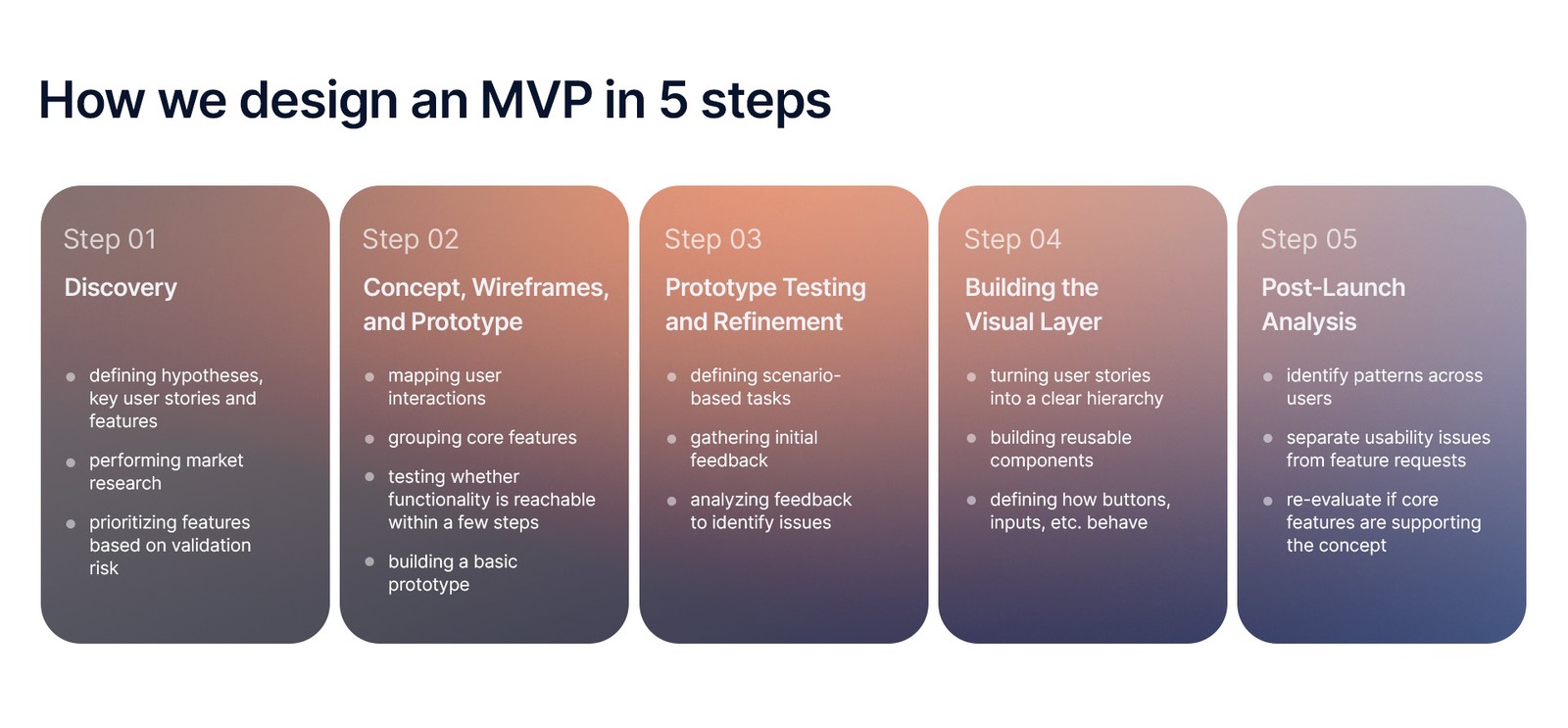
The MVP UX development process typically moves from discovery to structured wireframes, then to prototype testing, visual system assembly, and finally post-launch iteration.
We’ll break down these steps using a finance management app Artkai developed from concept to an investor-ready MVP within a couple of months. The product had to balance personal and business features while remaining clear and lightweight enough for early validation.
Step 1. Discovery
Before designing screens, you need a clear picture of three things: who the MVP is for, which cases it supports, and what users must be able to do from the start. Many later decisions during the development process, from navigation to UI density, depend on these fundamentals.
A solid product discovery process usually covers:
- Defining the hypotheses the MVP needs to test
- Validating ideas through structured early testing
- Understanding the pains and expectations of the target audience
- Understanding business constraints, operational needs, and stakeholder goals
- Conducting market research to analyze industry trends, competitors, and market dynamics
- Prioritizing features based on validation risk and strategic importance
In short, discovery turns assumptions into testable user stories and clarifies which essential features belong in the first release. Thorough discovery also keeps the MVP design process grounded in real user behavior, which makes the next stages of MVP design and development much easier to execute.
How Artkai applied this in practice
When we started working on a finance management app designed for women, the client came in with a clear ambition. The idea was to combine personal finance with business-oriented tools, including features like consolidated accounts and credit functionality.
But instead of jumping straight into designing the MVP UI, we first stepped back and looked at the assumptions behind the concept. Through market research and competitive analysis, we explored how existing finance tools position themselves, how women manage personal versus business finances, and where frustration usually shows up.
At the same time, persona development and journey mapping helped us see clear behavior patterns. One key insight stood out: while users often manage both personal and business finances, they keep those responsibilities separate in their minds. That distinction influenced not only MVP system design but also how we prioritized functionality.
As a result, several minimum viable product features were postponed because they didn’t support the main validation goal, while others were adjusted to better match user behavior.
Step 2. Concept, Wireframes, and Prototype Creation
Once discovery clarifies the user scenarios and basic functions, the next step in the MVP design process is to turn that clarity into structure. At this stage, teams usually focus on how users move through the product and how screens support their decisions.
This typically involves:
- Mapping primary user interactions across key flows
- Defining how core features are grouped and sequenced
- Testing if essential functionality is reachable within a few steps
- Building a basic prototype to simulate realistic behavior
In MVP software design, low-fidelity layouts help you ensure that the structure supports the concept and that potential users can easily complete the main scenario.
How Artkai applied this in practice
Once discovery showed us how users separate personal and business financial management, we moved into low-fidelity wireframes. The team primarily worked on the flows that defined the product’s core value: financial overview dashboards, account management, savings tools, and business-related actions.
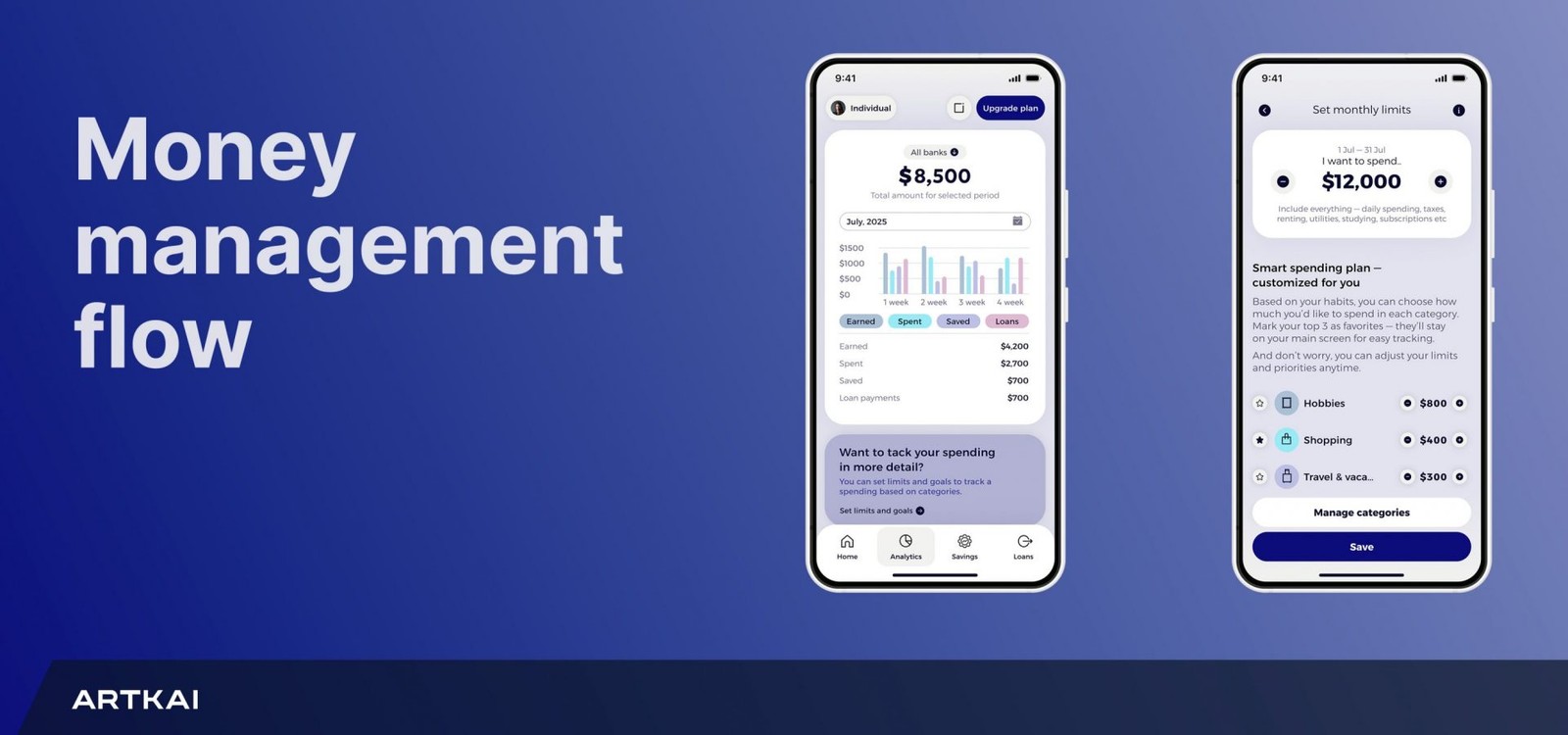
We wanted to see if:
- Switching between personal and business accounts felt natural
- Financial summaries stayed readable without overload
- Paths to key actions (such as exploring credit options) were easy to follow
At the same time, given the project timeline, we used AI-assisted tools like Figma Make to speed up early wireframing. Still, all structural decisions remained with the design team.
Once the main flows stabilized, we moved on to visual exploration. Because the product was designed for women, the visual language needed a careful balance. The interface had to feel warm and supportive without sliding into stereotypes or decorative excess. So, we built a visual system that felt confident and grounded thanks to branding alignment and UI refinement.
One distinctive step in this MVP development was introducing a supportive character into the interface. Using AI tools for visual experimentation allowed us to prototype this idea quickly and see how it affected the tone and perception.
By the end of this phase, the team had a clickable prototype that reflected the product’s core concept, respected the defined scope, and translated research insights into structured user interactions. From there, it became the foundation for further MVP development and investor presentations.
Step 3. Prototype Testing and Refinement
Testing is the next step in the MVP design process. During usability testing, participants from the target audience are asked to complete specific tasks tied to essential features, while the UX team observes how users interact with the product: where they pause, hesitate, or what they misunderstand.
The process usually involves:
- Defining scenario-based tasks
- Measuring whether a primary user story can be completed without assistance
- Gathering initial feedback tied to observable behavior
- Analyzing feedback to identify recurring structural issues
Addressing structural issues at this stage stabilizes MVP development, reduces risk before market testing, and ensures that the MVP UI design reflects the validated structure and sparks user interest. That is why collecting feedback and refining the prototype before committing to visual work is so important.
How Artkai applied this in practice
Once the clickable prototype was ready, we invited participants from the client’s early adopters to walk through the product with us. They were asked to switch between personal and business contexts, review financial summaries, and explore savings and credit options — the same tasks future users would perform in real life.
Instead of discussing if the interface “looked good,” we paid attention to behavior. Where did someone pause before taking the next step? Which labels triggered follow-up questions? Did the context switch feel obvious, or did it require explanation?
Based on what we observed, we made targeted adjustments:
- Financial summaries were reorganized to clarify hierarchy
- The switching mechanism between modes received clearer visual cues
- Secondary options were repositioned so they didn’t compete with the main flow
By the time the project reached full MVP development, both the structure and the MVP functionality had been tested against real behavior.
Step 4. Building the Visual Layer
When teams move from wireframes to MVP design, complexity usually increases. Visual choices, hierarchy, data density, edge cases — everything becomes more concrete to create a usable product.
This is where teams must resist expanding the scope of the minimum viable product design. During early MVP development, there’s constant pressure to expand scope: additional dashboards, advanced analytics, secondary flows, and optional features. But though each request may sound reasonable in isolation, together they dilute focus and complicate user interactions.
Strong MVP UX design at this point means:
- Turning approved user stories into a clear hierarchy of titles, actions, and data
- Building reusable components instead of redrawing similar elements across screens
- Defining how buttons, inputs, alerts, and states behave in every scenario
- Preparing structured files that developers can implement
Without that discipline, inconsistencies appear across screens, implementation slows during the MVP development process, and visual gaps surface only when the product reaches market testing.
How Artkai applied this in practice
In our case, financial data could have easily overwhelmed the interface. The product combined personal and business contexts, savings mechanisms, and monetization-related features such as credit options.
So we structured the MVP UI around clear decision-making. We put high-level financial summaries first, while keeping detailed breakdowns accessible without letting them dominate the screen, and introduced advanced features gradually instead of showing everything at once.
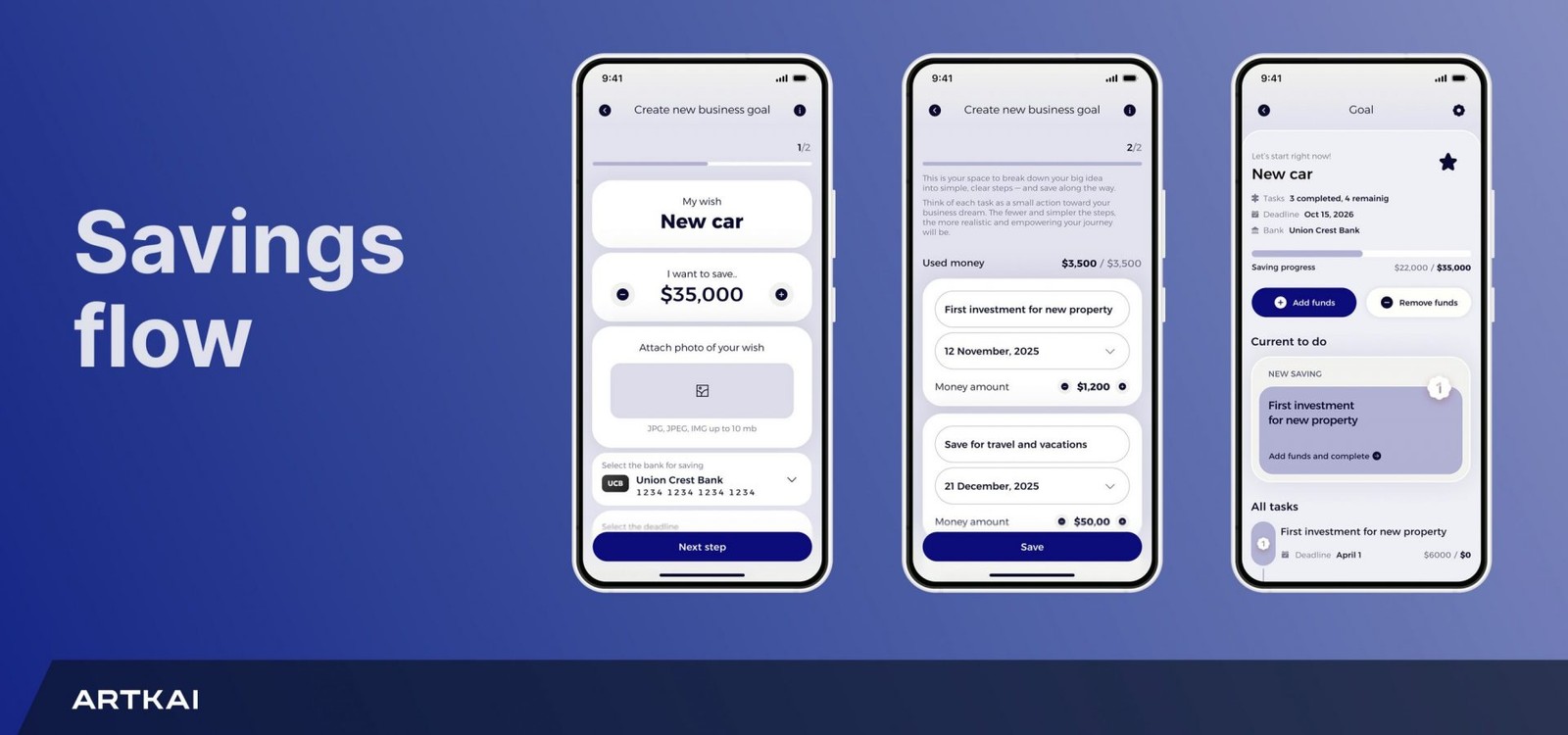
One important decision centered on how to separate personal and business modes. Technically, both could have lived inside one complex overview. However, from a UX perspective, that approach would have increased cognitive load. So, we implemented a clear switching mechanism that let users change context instantly, keeping each environment focused and readable.
Another trade-off involved gamifying the savings features. During the MVP development, we had ideas to expand them with badges and achievements, but we kept the interaction light for the app. After all, the goal was to encourage consistent saving behavior without adding decorative complexity that would distract users from key features.
During this phase, we deliberately limited the use of AI. This is because thoughtful design requires a real understanding of business goals, domain constraints, and user expectations, while automated suggestions often lead to generic patterns. So, the design team made the final calls on layout, hierarchy, and interaction.
Step 5. Post-Launch Analysis and Iteration
Once the product is live, feedback comes from real usage and not controlled sessions. At this stage of the MVP design process, the focus shifts to interpreting signals and deciding what belongs in the next iteration.
When clients return with input from users, we gather feedback systematically and:
- Identify recurring patterns instead of reacting to isolated opinions
- Separate usability adjustments from expansion ideas
- Reassess whether core features still support the original concept
- Align potential updates with business priorities before allocating resources
Each update should strengthen clarity and relevance. This approach keeps MVP development costs under control and ensures that every iteration supports both the concept and long-term direction.
How Artkai applied this in practice
The main goal of gathering user feedback was to strengthen key product decisions and protect the integrity of the MVP design process. By focusing on how people actually used the product, we could confirm that the MVP functionality made sense and the essential features supported the right use cases.
From there, we prepared the product for investor presentations with a clearer story around:
- Who the target audience was
- Which MVP functionality and essential features set the product apart
- How the product supported future development
Once a project moves past prototype validation, we get more systematic about our feedback loops. This usually includes:
- Connecting insights back to real user stories
- Using data analytics, when available, to see how people behave in the product
- Running short cycles to test changes before committing to anything big
- Sorting feedback based on what affects the core experience and the overall development process
AI tools help us process transcripts and spot recurring issues faster. Still, the team makes the final calls. Automated summaries save time, but they don’t see business trade-offs or technical constraints in MVP software development. In an iterative process, those trade-offs must be strictly evaluated at every stage.
In the end, the point of working with user feedback during MVP design and development is to make the product clearer, not bigger. Each iteration should sharpen essential features and prepare the system for further development without forcing teams to rebuild what already works.
Conclusions
A product concept only really gets tested when people start using the minimum viable product. That’s why MVP UX design matters so much.
If users can’t quickly find the core features, understand what the product does, or complete basic actions without friction, engagement data becomes unreliable. Strong MVP UI design keeps essential functionality clear and aligned with what the product is trying to validate.
With that foundation in place, MVP design and development helps teams clearly see where users get stuck, which features they rely on, and where they drop off before deeper MVP software development begins.
If you’re getting ready to build a new product, you can explore our MVP development services or take a look at our MVP development guide. When you’re ready to discuss your idea, contact us, and we’ll set up a free consultation right away.
Clients and Results






Schedule your free consultation
Don't miss this opportunity to explore the best path for your product. We are ready to delve into the specifics of your project, providing you with expert insights and optimal solutions.
Book your free sessionRead More
Explore articles from Artkai - we have lots of stories to tell
Join us to do the best work of your life
Together we advance the human experience through design.